Step Group in Test Case and Test Automation
There are cases when a user needs to reuse a sequence of steps or a single step across multiple test cases.
To support this, Ottotest allows users to create Step Groups.
A Step Group is a reusable set of steps (like function in programming) that can be defined once and inserted into other test cases.
This helps reduce duplication, improve consistency, and simplify maintenance.
For example, you can design and automate login steps once and reuse them as a precondition in multiple test cases. This approach saves time during test design and significantly simplifies future test maintenance.
Benefits of Step Groups
Using Step Groups provides several advantages:
- Reusability – design and automate steps once and reuse them across multiple test cases
- Consistency – ensures the same actions are performed in the same way everywhere
- Maintainability – updating the Step Group automatically updates all test cases that use it
- Faster test design – reduces repetitive work when creating new test cases
Example Use Case — Login Step Group
A common example is creating a Login Step Group that can be reused across many tests.
Step Group: User Login
Actions
1. Navigate to ${env.base_url}/login
2. Enter ${prf.user_email}
3. Enter ${prf.password}
4. Click Login
Validations
1. Verify "Welcome back" text is visible in page
2. Verify url contains "/dashboard"
After adding a Step Group to the test, you must sync it with automation.
Go to Automate with AI → Edit → Sync → Save Automation.
Pass data or retrieve data from Step Group
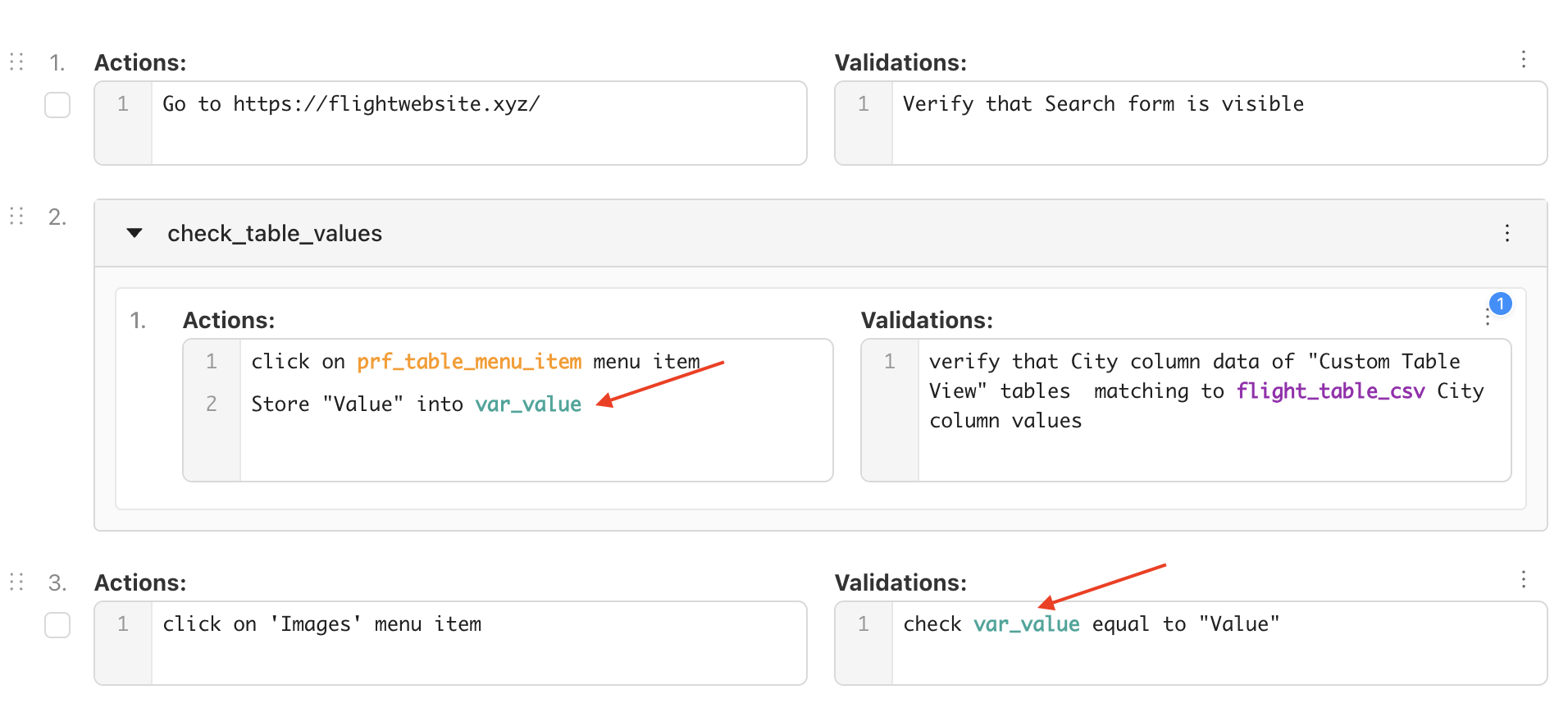
Step Groups allow you to reuse a sequence of steps across multiple test cases. Variables can be used to pass data into a Step Group or retrieve data produced inside a Step Group.
This enables Step Groups to behave like reusable functional blocks that can accept inputs and produce outputs.
Passing Data to a Step Group
To pass data to a Step Group:
- Define or assign a variable before calling the Step Group.
- Use that variable inside the Step Group steps.
Because variables are available within the test execution context, the Step Group can access variables defined earlier in the test.
Retrieving Data from a Step Group
To retrieve data from a Step Group:
- Extract or assign a variable inside the Step Group.
- Use the same variable in the steps following the Step Group.
This allows the Step Group to generate or capture data that is required later in the test.
Maintenance Advantage
If the login flow changes (for example, an additional two-factor authentication step is introduced), you only need to update the Login Step Group once.
All test cases that reference this Step Group will automatically use the updated steps during execution.
Best Practices
- Use Step Groups for common flows such as login, logout, navigation, or setup steps.
- Keep Step Groups focused and reusable.
- Avoid creating overly large Step Groups that perform multiple unrelated actions.
- Combine Step Groups and Variables to create flexible and maintainable test cases.
Proper use of Step Groups makes test suites cleaner, easier to maintain, and faster to design and automate.